
Description
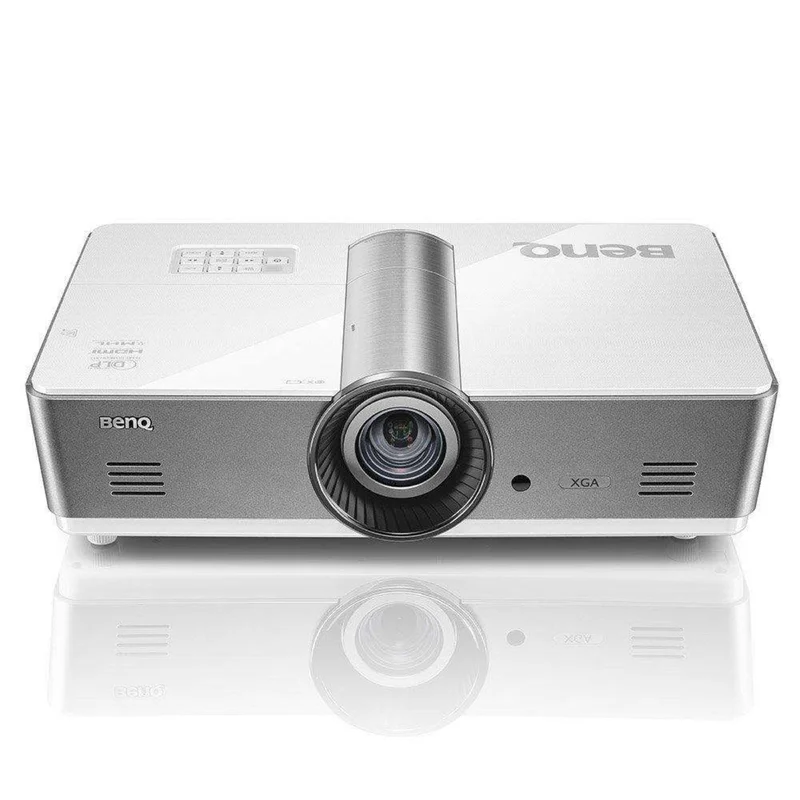
BenQ SX920 XGA DLP 5000lm Projector Manufacturer RFB – SX920
Features
The BenQ SX920 is a powerful projector designed to meet the demanding needs of modern corporate settings. With its impressive 5,000 lumens of brightness and advanced features, the SX920 ensures clear, vibrant projections even in ambient light, making it ideal for medium-sized conference rooms where presentations, debates, and collaborations are crucial.
Vivid Clarity for Productive Meetings
-
High Brightness for Comfortably Lit Environments: The SX920’s 5,000 ANSI lumens deliver exceptional brightness, making it perfect for presentations in medium-sized conference rooms. This high luminance ensures that debates, collaboration, note-taking, and discussions can continue seamlessly without any visual compromise, helping teams achieve productive meetings.
-
Industry-Leading Contrast for Sharp Readability: With a superior contrast ratio and enhanced pixel fill factor, the SX920 produces true blacks and stunning image sharpness. This ensures that both black-and-white documents and colorful presentations are easy to read, reducing eye strain and providing unmatched clarity.
Flexible Installation for Easy Integration
-
1.6x Big Zoom for Efficient Upgrades: The SX920 is equipped with a 1.6x zoom, making it easy to upgrade to new projection technology without the need for costly renovations. Whether you are replacing an older projector or adapting to a new space, the SX920 can project images up to 300″ from distances ranging from 1.7 to 11.0 meters, saving both time and money during installation.
-
Vertical Lens Shift for Precise Alignment: The projector’s vertical lens shift allows for fine-tuning of image alignment within a range of 107.5%-115%. This flexibility ensures that your images remain perfectly aligned, even in cases where installation adjustments are required.
-
Advanced Image Calibration: Equipped with a two-dimensional keystone correction range of ±30° both horizontally and vertically, the SX920 compensates for trapezoid distortion caused by off-center installations. The Corner Fit control lets installers adjust each corner independently for flawless image geometry.
-
Central Lens Design for Simple Setup: The SX920 features a centrally located lens design, which simplifies the installation process without the need for complex calculations or additional adjustments.
-
Simplified Lamp Maintenance: The projector comes with a quick-release lamp door for easy lamp maintenance, allowing IT managers to perform necessary servicing without having to remove the projector from its ceiling mount.
Comprehensive Network Control and Management
-
Network Control and LAN Compatibility: The SX920 integrates seamlessly into corporate networks with wide compatibility for control systems like Crestron, AMX, and PJ-Link. With LAN control, you can easily manage and monitor the projector remotely. Additionally, the SX920 supports RS-232 control for reliable long-distance installations up to 15 meters when LAN connectivity is unavailable.
-
Wireless Presentation Capabilities: Thanks to MHL connectivity, the SX920 enables presenters to wirelessly share presentations and business documents directly from their mobile devices. By using an MHL cable or dongle, you can effortlessly connect and present without interruptions. The onboard USB port even supplies 5V 1.5A power to HDMI dongles, ensuring smooth, continuous presentations.
What is the Include
- BenQ SX920 Projector
- Remote
- Lens cover
- Battery
- VGA Cable
- Quick start guide
- User manual CD
Specifications
| Model | SX920 | ||
|---|---|---|---|
| Power Management Function | Power Management Function | Automatic power off after 20 minutes without a display source | Automatic power off after 20 minutes without a display source |
| Power Management Function | |||
| Automatic power off after 20 minutes without a display source | |||
| Lens Shift | Lens Shift | Vertical: +7.5% | Vertical: +7.5% |
| Lens Shift | |||
| Vertical: +7.5% | |||
| Native Resolution | XGA (1024 x 768) | XGA (1024 x 768) | |
| XGA (1024 x 768) | |||
| Brightness* (ANSI Lumens) | 5000 ANSI Lumens | ||
| Contrast Ratio | 5000:1 | ||
| Display Color | 1.07 Billion Colors | ||
| Lens | F=2.45~3.07, f=15.78~25.12 | F=2.45~3.07, f=15.78~25.12 | |
| F=2.45~3.07, f=15.78~25.12 | |||
| Aspect Ratio | Native 4:3 (5 aspect ratio selectable) | Native 4:3 (5 aspect ratio selectable) | |
| Native 4:3 (5 aspect ratio selectable) | |||
| Throw Ratio | 1.41~2.25 | 1.41~2.25 | |
| 1.41~2.25 | |||
| Image Size (Diagonal) | 60″~240″ | ||
| Zoom Ratio | 1.6X | ||
| Lamp Type | 370W | ||
| Lamp Mode (Normal/ Economic/ SmartEco/ LampSave/ LumenCare)* | 2000/2500 hours | ||
| Keystone Adjustment | 2D, Vertical & Horizontal ± 30 degrees | 2D, Vertical & Horizontal ± 30 degrees | |
| 2D, Vertical & Horizontal ± 30 degrees | |||
| Projection Offset | 107.5% ±2.5% | 107.5% ±2.5% | |
| 107.5% ±2.5% | |||
| Resolution Support | VGA (640 x 480) to UXGA (1600 x 1200) | VGA (640 x 480) to UXGA (1600 x 1200) | |
| VGA (640 x 480) to UXGA (1600 x 1200) | |||
| Horizontal Frequency | 15 – 102KHz | ||
| Vertical Scan Rate | 24Hz~120Hz | 24Hz~120Hz | |
| 24Hz~120Hz | |||
| Interface | Computer In (D-sub 15pin) x 1 (Share with component) Monitor Out (D-sub 15pin) x 1 Composite Video In (RCA) x 1 S-Video In (Mini DIN 4pin) x 1 HDMI x 2 (one MHL) Audio In (Mini Jack) x 1 Audio L/R in (RCA) x 1 Audio Out (Mini Jack) x 1 Microphone-in (Mini Jack) x 1 20W Stereo Speaker LAN (RJ45) x 1 (LAN Control) USB (Type A) x 1 (1.5A power supply) USB (Type mini B) x 1 (Download) 12V Trigger x 1 RS232 (DB-9pin) x 1 IR Receiver x 2 |
||
| Dimensions (W x H x D mm) | 16.18 x 4.66 x 10.53 inches (411.4 x 118.4 x 267.5mm) | 16.18 x 4.66 x 10.53 inches (411.4 x 118.4 x 267.5mm) | |
| 16.18 x 4.66 x 10.53 inches (411.4 x 118.4 x 267.5mm) | |||
| HDTV Compatibility | 480i, 480p, 576i, 576p, 720p, 1080i, 1080p | 480i, 480p, 576i, 576p, 720p, 1080i, 1080p | |
| 480i, 480p, 576i, 576p, 720p, 1080i, 1080p | |||
| Video Compatibility | NTSC, PAL, SECAM | ||
| Weight | 4.9 kg (10.8lbs) | ||
| Audible Noise (Normal/ Economic Mode) | 36 / 33 dBA (Normal/Economic mode) | ||
| Power Supply | AC100 to 240V, 50 to 60 Hz | ||
| Power Consumption | Typical 490W, Network Standby <6W, Stanby Power <0.5W | Typical 490W, Network Standby <6W, Stanby Power <0.5W | |
| Typical 490W, Network Standby <6W, Stanby Power <0.5W | |||
| On-Screen Display Languages | Arabic/ Bulgarian/ Croatian/ Czech/ Danish/ Dutch/ English/ Finnish/ French/ German/ Greek/Hindi/ Hungarian/ Italian/ Indonesian/ Japanese/ Korean/Norwegian/ Polish/ Portuguese/Romanian/ Russian/ Simplified Chinese/ Spanish/ Swedish/ Turkish/ Thai/ Traditional Chinese (28 Languages) |
||
| Accessories (Standard) | Remote Control w/ Battery Power Cord (by region) User Manual CD Quick Start Guide Lens Cover x 1 Warranty Card (by region) VGA (D-sub 15pin) Cable |
||
| Accessories (Optional) | Spare Lamp Kit P/N: 5J.JDP05.001 Ceilling Mount P/N: 5J.JAM10.001 QCast Dongle P/N: 5J.JCK28.A01 Remote Control RCA022 P/N: 5J.JA606.001 3D Glasses P/N: 5J.J9H25.001 |
What Our Experts Think
-
Powerful XGA Resolution: The BenQ SX920 offers XGA (1024×768) resolution, providing clear and detailed images, ideal for business presentations, classrooms, and other professional environments.
-
Bright 5000 Lumens for Any Environment: With an impressive 5000 ANSI lumens brightness, this projector ensures vibrant and crisp visuals even in well-lit rooms, making it perfect for large venues or spaces with ambient light.
-
Long-Lasting Lamp Life: With a lamp life of up to 15,000 hours, the SX920 is designed for durability, reducing the need for frequent replacements and offering great value over time.
-
Flexible Installation Options: Featuring vertical lens shift and zoom capabilities, this projector offers flexible installation and image alignment, making it easier to set up in various environments.
-
Wide Connectivity: The SX920 supports multiple connectivity options, including HDMI, VGA, and USB, allowing you to connect a variety of devices like laptops, media players, and more.
-
Quiet Operation for Professional Settings: Despite its high brightness, the SX920 operates quietly, ensuring that your presentations or meetings are not interrupted by distracting projector noise.
Q&A
Q: What is the BenQ SX920 XGA DLP 5000lm Projector designed for?
A: The BenQ SX920 is an XGA DLP projector designed for professional use in large venues, classrooms, and conference rooms. It offers 5000 lumens brightness, making it ideal for clear and vibrant presentations in well-lit environments.
Q: What are the key features of the BenQ SX920?
A: Key features include XGA (1024×768) resolution, 5000 ANSI lumens brightness, a high contrast ratio for sharp details, long lamp life, and multiple connectivity options (HDMI, VGA, etc.) for versatile installation and use.
Q: What does the RFB model mean?
A: The RFB (Refurbished) model refers to a factory-refurbished unit that has been professionally restored to like-new condition, thoroughly tested, and typically offered at a lower price than a new unit.
Q: Is the BenQ SX920 easy to install?
A: Yes, the SX920 offers flexible installation with features such as zoom, lens shift, and keystone correction, making it easy to adjust and place the projector in a variety of settings.
Q: Does the BenQ SX920 come with a warranty?
A: Yes, the refurbished BenQ SX920 comes with a manufacturer’s warranty, providing coverage for defects and performance issues within a specific period after purchase.
Maintenance Tips
- Lens Cleaning: Use a soft, microfiber cloth to gently wipe the lens clean of dust, smudges, or fingerprints. Avoid using harsh chemicals or abrasive materials that could damage the lens.
- Clean the Air Filter: Regularly check and clean the air filter (every 1-3 months) to prevent dust buildup. Use a soft brush or gentle vacuum to remove any debris to ensure proper airflow.
- Ensure Proper Ventilation: Place the projector in a well-ventilated area, and never block the vents. Proper ventilation helps prevent overheating and ensures optimal performance.
- Monitor Lamp Life: Track the projector’s lamp usage and replace it as needed. A worn-out lamp will affect brightness and image quality.
- Store Properly: When not in use, store the projector in a dry, dust-free place. Use a protective cover to shield it from dust and other elements.
- Inspect Cables and Connections: Check power cords and video cables regularly for wear or damage. Ensure that all cables are properly connected before use to avoid signal issues.
- Unplug After Use: Always turn off and unplug the projector when it’s not in use to conserve energy and prevent wear on internal components.
Reviews
There are no reviews yet.